Type what’s on your mind, in any order. Clivio turns it into dated tasks, a note and a project, and you keep what works for you.
21-second film, no voice-over. Fictional example.
Write tasks the way they come to you
A task fits in one sentence, with its date and its urgency inside. When ten of them show up at once, open Capture and jot everything down in any order. Clivio then splits it into tasks.
call l.martin back re liability cert
pay imprimerie du canal before 11/5 !!
tilleuls registration cert -> ask them
sort the 2025 rent receipts someday
accountant thursday, vat
and think about the bastide quote
One line is enough
Type “Chase Studio Bastide Friday, urgent” and press Enter. Clivio understands the date and the priority, which can be high, medium or low. Type @ to link a document, and you can then open it from the task.
Each task added in one line uses one AI action.
Capture, to clear your head
It’s a blank page where you write everything down, in no particular order and without worrying about punctuation. When you click “Structure”, Clivio turns it into tasks, with a date and a priority if you wrote them.
“Structure” also uses one AI action.
A contract is full of dates. Clivio suggests them as tasks.
Open a contract, a quote or an invoice and click “Extract obligations”. Clivio finds the dated deadlines and shows them to you one at a time, and you keep the ones that concern you.
Service agreement: visual identity
Studio Bastide · signed October 12, 2026 · 4 pages
Extraction runs on the open document when you click the button. Nothing is extracted unless you ask.
Each deadline comes with its date and its type (payment, renewal, termination or milestone). You tick the ones you want to keep.
Once added, the task stays linked to the contract. It shows up in the calendar, and Clivio emails you a reminder 7 days and 1 day before.
Contracts, quotes, invoices, purchase orders, offer lettersOnly dated deadlines are suggestedUp to 10 per document
Tasks that start from an email or a missing document
An email with no attachment becomes a suggested task
Forward it to your Clivio address. If there’s an attachment, it’s analyzed as a document. If there isn’t, the email is usually a request, so Clivio suggests it as a task for you to approve in “To process”.
Hi Camille, could you send us your liability insurance certificate before work starts on Monday the 19th? Thanks.
No attachmentRequest a missing document from the task
Say your task is waiting on a landlord’s registration certificate or a client’s signed form. You can request the document from the person directly. Clivio creates a dedicated upload link for you to send, and the request stays attached to the task.
Today’s tasks and the ones coming up
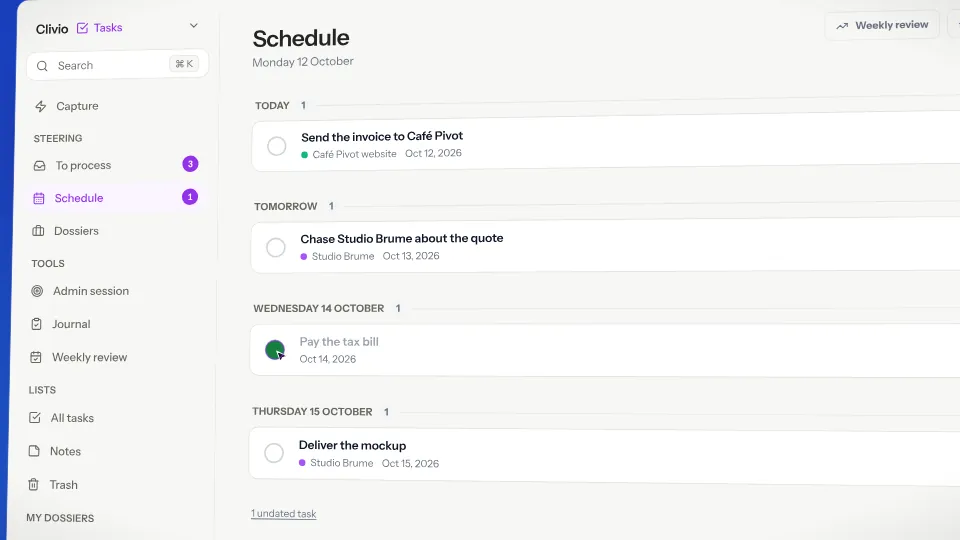
The views are there to help you decide what to do now. A weekly review helps you take stock, and each morning, if you want, Clivio suggests a plan for your day.
Fictional example.
What’s overdue, what’s due today, this week and later, in one list.
The tasks Clivio suggests wait here until you approve or dismiss them.
A moment to look back on the week and leave with a clean list.
Clivio suggests a plan for the day, built from your tasks.
Two email reminders before each deadline
For tasks that come from a document or from the French tax calendar, Clivio emails you ahead of the deadline at 8 a.m. your time, and the reminder also shows up in the app. By default they go out 7 days and 1 day before, and you can add one 3 days before. On Mondays you also get a summary of the week by email.
There are no push notifications on your phone. Everything goes through email and the app.
Tasks and their priorities, the calendar and email reminders.
Running “Structure” on a capture also counts as one action.
500 on Pro. The counter resets on the 1st of every month. Compare plans
About tasks
Does Clivio add tasks without asking me?
No. A document’s deadlines are extracted when you click “Extract obligations”, then suggested one at a time. An email with no attachment also arrives as a suggestion. Nothing goes on your list without your OK.
Which deadlines does it pick up in a document?
Only deadlines with a date, whether it’s a payment, a renewal, a termination or a milestone. It looks for them in contracts, quotes, invoices, purchase orders and offer letters, up to 10 per document. An obligation with no date, like “provide the logos”, isn’t suggested.
Will I get notifications on my phone?
No, there are no push notifications. Reminders arrive by email and in the app at 8 a.m. local time, 7 days and 1 day before by default, with an optional one 3 days before. They cover tasks that come from a document or from the tax calendar.
Can I link a task to a document?
Yes. Tasks extracted from a document stay linked to it, and you can link any task by typing @ followed by the document’s name. These links also appear in Clivio’s graph.
Is it included in the Free plan?
Yes, tasks and reminders are included. Adding a task in one line and running “Structure” each use one AI action, out of the 50 on the Free plan (500 on Pro), which reset on the 1st of the month.
Read next
Drop in a contract. Watch the dates come out of it.
It’s free for up to 50 documents, with no credit card, and tasks and reminders are included.